What caused the large AWS outage?
What caused the large AWS outage?On Monday, a major AWS outage hit thousands of sites & apps, and even a Premier League soccer game. An overview of what caused this high-profile, global outage
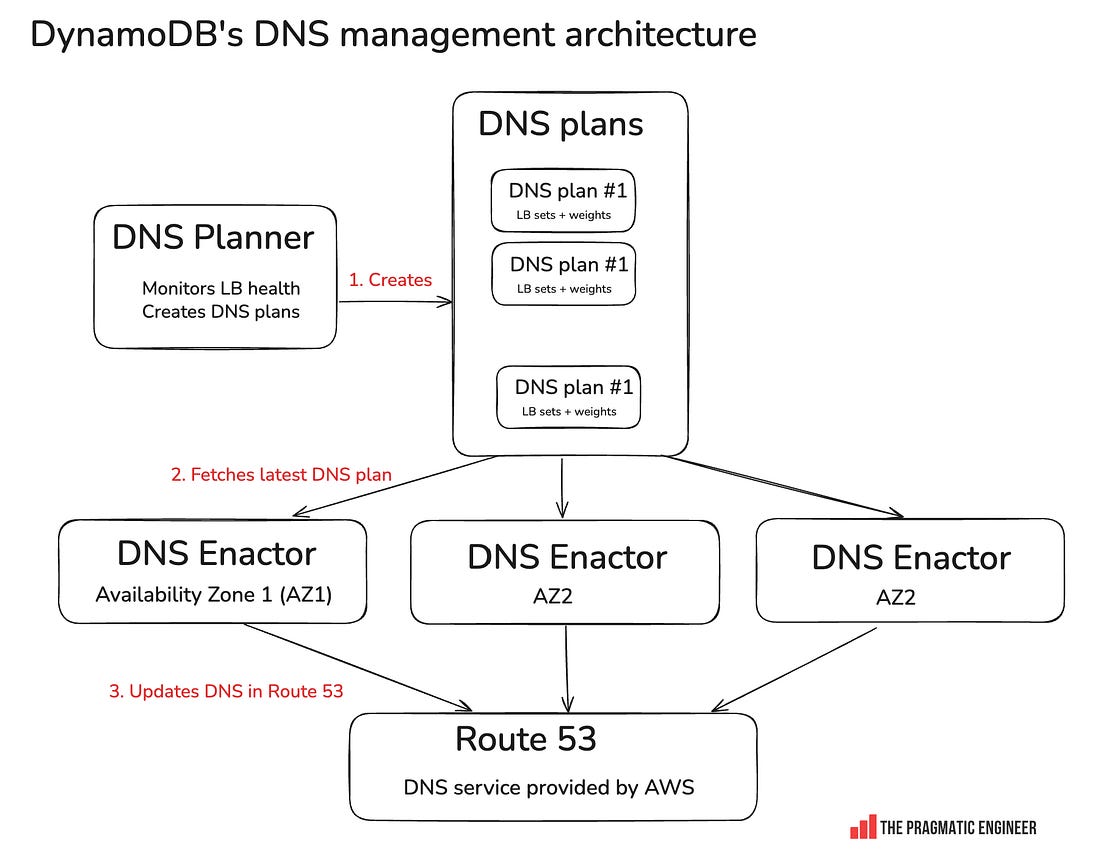
Hi, this is Gergely with a bonus, free issue of the Pragmatic Engineer Newsletter. In every issue, I cover Big Tech and startups through the lens of senior engineers and engineering leaders. Today, we cover one out of four topics from today’s deepdive into the recent AWS outage. To get articles like this in your inbox, every week, subscribe here. Monday was an interesting day: Signal stopped working, Slack and Zoom had issues, and most Amazon services were also down, together with thousands of websites and apps, across the globe. The cause was a 14-hour-long AWS outage in the us-east-1 region — which outage even disrupted a Premier League soccer game. Today, we look into what caused this outage. To its credit, AWS posted continuous updates throughout the outage. Three days after the incident, they released a detailed postmortem – much faster than the 4 months it took in 2023 after a similarly large event. The latest outage was caused by DynamoDB’s DNS failure. DynamoDB is a serverless NoSQL database built for durability and high availability, which promises 99.99% uptime as its service level agreement (SLA), when set to multi-availability zone (AZ) replication. Basically, when operated in a single region, DynamoDB promises – and delivers! – very high uptime with low latency. Even better, while the default consistency model for DynamoDB is eventual consistency (reads might not yet reflect the actual status), reads can also be set to use strong consistency (guaranteed to return the actual status). All these traits make DynamoDB an attractive choice for data storage for pretty much any application, and many of AWS’s own services also depend heavily on DynamoDB. Plus, DynamoDB has a track record of delivering on its SLA promises, so the question is often not why to use DynamoDB, but rather, why not to use this highly reliable data storage. Potential reasons for not using it include complex querying, complex data models, or storing large amounts of data when storage costs are not worth it compared to other bulk storage solutions. In this outage, DynamoDB went down, and the How DynamoDB DNS management happensHere’s an overview:
How it works:
DynamoDB down for 3 hoursSeveral independent events combined to knock DynamoDB’s DNS offline:
These three things pushed the system into an inconsistent state and emptied out DynamoDB DNS:
DynamoDB going down also took down all AWS services dependent on the us-east-1 DynamoDB services. From the AWS postmortem:
The DynamoDB outage lasted around 3 hours; I can only imagine AWS engineers scratching their heads and wondering how the DNS records were emptied. Eventually, engineers manually intervened, and brought back DynamoDB. It’s worth remembering that bringing up DynamoDB might have included avoiding the thundering herd issue that is typical of restarting large services. To be honest, I’m sensing key details were omitted from the postmortem. Things unmentioned which are key to understanding what really happened:
Amazon EC2 down for 12 more hoursWith DynamoDB restored, the pain was still not over for AWS. In fact, Amazon EC2’s problems just got worse. To understand what happened, we need to understand how EC2 works:
State check results are stored in DynamoDB, so the DynamoDB outage caused problems: 1. Leases started to time out. With state check results not returning due to the DynamoDB outage, the DropletWorkflow Manager started to mark droplets as not available. 2. Insufficient capacity errors on EC2: with most leases timed out, DWFM started to return “insufficient capacity error” messages to EC2 customers. It thought servers were not available, after all. 3. DynamoDB’s return didn’t help: when DynamoDB came back online, it should have been possible to update the status of droplets. But that didn’t happen. From the postmortem:
It took engineers 3 more hours to come up with mitigations to get EC2 instance allocation working again. Network propagation errors took another 5 hours to fix. Even when EC2 was looking healthy on the inside, instances could not communicate with the outside world, and congestion built up inside a system called Network Manager. Also from the postmortem:
Final cleanup took another 3 hours. After all 3 systems fixed – DynamoDB, EC2’s DropletWorkflow Manager and Network Manager – there was a bit of cleanup left to do:
Phew – that was a lot of work! Props to the AWS team for working through it all in what must have been a stressful night’s work. You can read the full postmortem here, which details the impact on other services like the Network Load Balancer (NLB), Lambda functions, Amazon Elastic Container Service (ECS), Elastic Kubernetes Service (EKS), Fargate, Amazon Connect, AWS Security Token Service, and AWS Management Console. This was one out of four topics from today’s The Pulse, analyzing this large AWS outage. The full issue additionally covers:
You’re on the free list for The Pragmatic Engineer. For the full experience, become a paying subscriber. Many readers expense this newsletter within their company’s training/learning/development budget. If you have such a budget, here’s an email you could send to your manager. This post is public, so feel free to share and forward it. If you enjoyed this post, you might enjoy my book, The Software Engineer's Guidebook. Here is what Tanya Reilly, senior principal engineer and author of The Staff Engineer's Path said about it:
|




Comments
Post a Comment