The Pulse: Cloudflare takes down half the internet – but shares a great postmortem
The Pulse: Cloudflare takes down half the internet – but shares a great postmortemA database permissions change ended up knocking Cloudflare’s proxy offline. Pinpointing the root cause was tricky – but Cloudflare shared a detailed postmortem. Also: announcing The Pragmatic Summit
Before we start: I’m excited to share something new: The Pragmatic Summit. Four years ago, The Pragmatic Engineer started as a small newsletter: me writing about topics relevant for engineers and engineering leaders at Big Tech and startups. Fast forward to today, and the newsletter crossed one million readers, and the publication expanded with a podcast as well. One thing that was always missing: meeting in person. Engineers, leaders, founders—people who want to meet others in this community, and learn from each other. Until now that is:
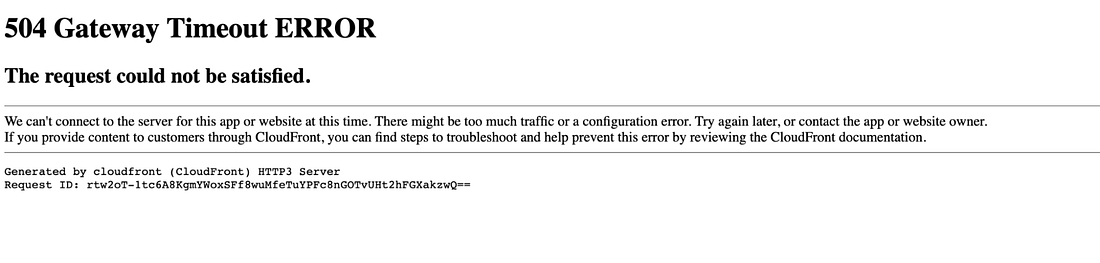
In partnership with Statsig, I’m hosting the first-ever Pragmatic Summit. Seats are limited, and tickets are priced at $499, covering the venue, meals, and production—we’re not aiming to make any profit from this event. I hope to see many of you there! Cloudflare takes down half the internet – but shares a great postmortemOn Tuesday came another reminder about how much of the internet depends on Cloudflare’s content delivery network (CDN), when thousands of sites went fully or partially offline in an outage that lasted 6 hours. Some of the higher-profile victims included:
Separately, you may or may not recall that during a different recent outage caused by AWS, Elon Musk noted on his website, X, that AWS is a hard dependency for Signal, meaning an AWS outage could take down the secure messaging service at any moment. In response, a dev pointed out that it is the same for X with Cloudflare – and so it proved earlier this week, when X was broken by the Cloudflare outage.
That AWS outage was in the company’s us-east-1 region and took down a good part of the internet last month. AWS released incident details three days later – unusually speedy for the e-commerce giant – although that postmortem was high-level and we never learned exactly what caused AWS’s DNS Enactor service to slow down, triggering an unexpected race condition that kicked off the outage. What happened this time with Cloudflare?Within hours of mitigating the outage, Cloudflare’s CEO Matthew Prince shared an unusually detailed report of what exactly went wrong. The root cause was to do with propagating a configuration file to Cloudflare’s Bot Management module. The file crashed Bot Management, which took Cloudflare’s proxy functionality offline. Here’s a brief overview of how Cloudflare’s proxy layer works at a high level. It’s the layer that protects the “origin” resources of customers – minimizing network traffic to them by blocking malicious requests and caching static resources in Cloudflare’s CDN:
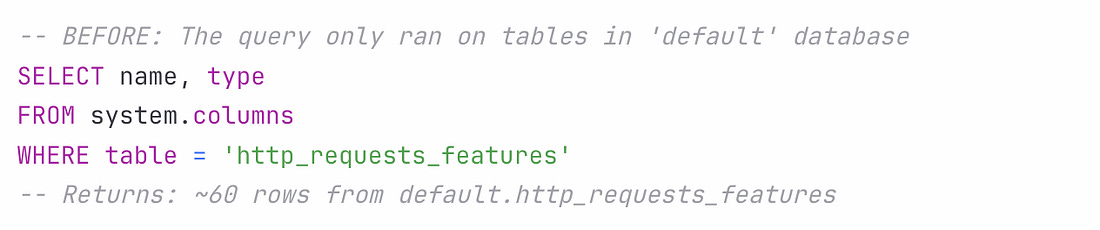
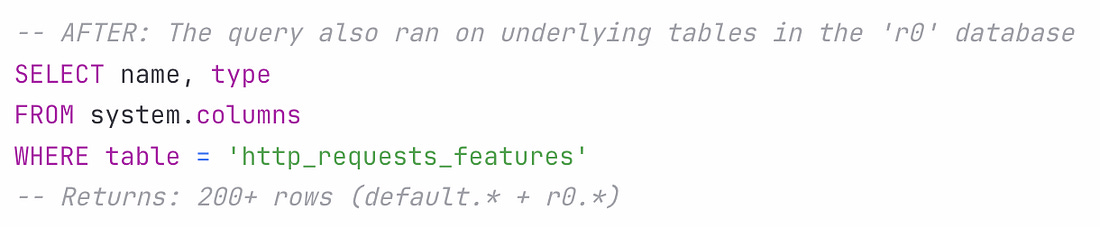
Here’s how the incident unfolded: A database permissions change in ClickHouse kicked things off. Before the permissions changed, all queries to fetch feature metadata (to be used by the Bot Management module) would have only been run on distributed tables in Clickhouse, in a database called “default” which contains 60 features.
Until now, these queries were running using a shared system account. Cloudflare’s engineering team wanted to improve system security and reliability, and move from this shared system account to individual user accounts. User accounts already had access to another database called “r0”, so the team made the database permission change for access to r0 to be implicit instead of explicit. As a side effect of this, the same query collecting the features to be passed to Bot Management started to fetch from the r0 database, and return many more features than expected:
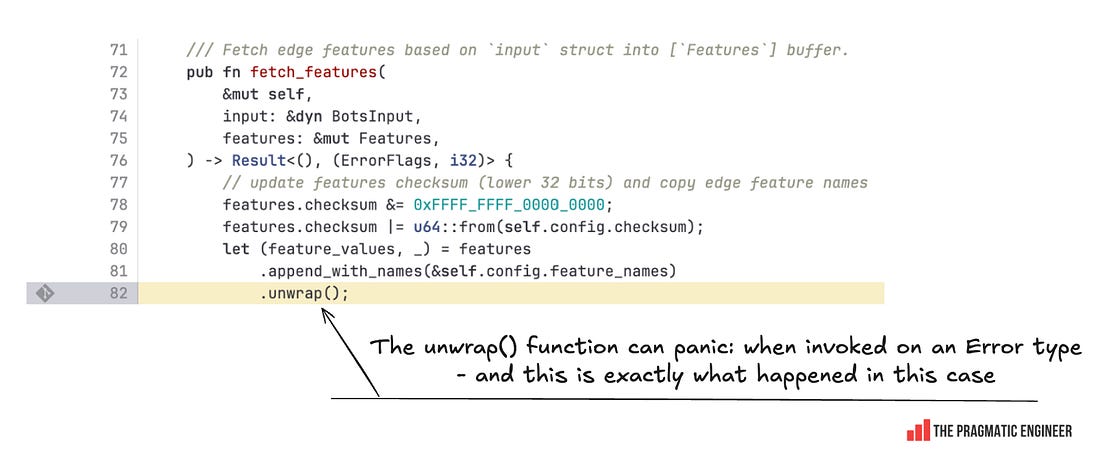
The Bot Management module does not allow loading of more than 200 features. This limit was well above the production usage of 60, and was put in place for performance reasons: the Bot Management module pre-allocates memory for up to 200 features, and it will not operate with more than this number. A system panic hit machines served with the incorrect feature file. Cloudflare was nice enough to share the exact code that caused this panic, which was this unwrap() function:
What likely happened:
Edge nodes started to crash, one by one, seemingly randomly. The feature file was being generated every 5 minutes, and gradually rolled out to Edge nodes. So, initially, it was only a few nodes that crashed, and then over time, more became non-responsive. At one point, both good and bad configuration files were being distributed, making failed nodes that received the good configuration file start working – for a while! Why so long to find the root cause?It took Cloudflare engineers unusually long – 2.5 hours! – to figure all this out, and that an incorrect configuration file propagating to Edge servers was to blame for their proxy going down. Turns out, an unrelated failure made the Cloudflare team suspect that they were under a coordinated botnet attack, as when a few of the Edge nodes started to go offline, the company’s status page did, too:
The team tried to gather details about the attack, but there was no attack, meaning they wasted time looking in the wrong place. In reality, the status page going down was a coincidence and unrelated to the outage. But it’s easy to see why their first reaction was to figure out if there was a distributed denial of service (DDoS) attack. As mentioned, it eventually took 2.5 hours to pinpoint the incorrect configuration files as the source of the outage, and another hour to stop the propagation of new files, and create a new and correct file, which was deployed 3.5 hours after the start of the incident. Cleanup took another 2.5 hours, and at 17:06 UTC, the outage was resolved, ~6 hours after it started. Cloudflare shared a detailed review of the incident and learnings, which can be read here. How did the postmortem come so fast?One thing that keeps being surprising about Cloudflare is how they have a very detailed postmortem up in less than 24 hours after the incident is resolved. Cofounfer and CEO Matthew Prince explained how this was possible:
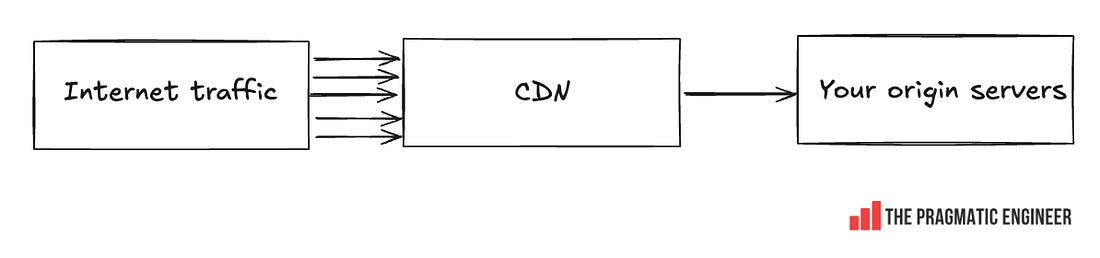
Talk about moving with the speed of a startup, despite being a publicly traded company! LearningsThere is much to learn from this incident, such as: Be explicit about logging errors when you raise them! Cloudflare could probably have identified the root cause of this error much faster if the line of code that returned an error, also logged the error, and if Cloudflare had alerts set up when certain errors spiked on its nodes. It could have surely shaved an hour or two off the time it took to mitigate. Of course, logging errors before throwing them is extra work, but when done with monitoring or log analysis, it can help find the source of errors much faster. Global database changes are always risky. You never know what part of the system you might hit. The incident started with a seemingly innocuous database permissions change that impacted a wide range of queries. Unfortunately, there is no good way to test the impact of such changes (if you know one, please leave a comment below!) Cloudflare was making the right kind of change by removing global systems accounts; it’s a good direction to go in for security and reliability. It was extremely hard to predict the change would end up taking down a part of their system – and the web. Two things going wrong at the same time can really throw an engineering team. If Cloudflare’s status page did not go offline, the engineering team would have surely pinpointed the problem much faster than they did. But in the heat of the moment, it’s easy to assume that two small outages are connected, until there’s evidence that they’re not. Cloudflare is a service that’s continuously under attack, so the engineering team can’t be blamed for assuming it might be more of the same. CDNs are the backbone of the internet, and this outage doesn’t change that. The outage hit lots of large businesses, resulting in lost revenue for many. But could affected companies have prepared better for Cloudflare going down? The problem is that this is hard: using a CDN means taking on a hard dependency in order to reduce traffic on your own servers (the origin servers), while serving internet users faster and more cheaply:
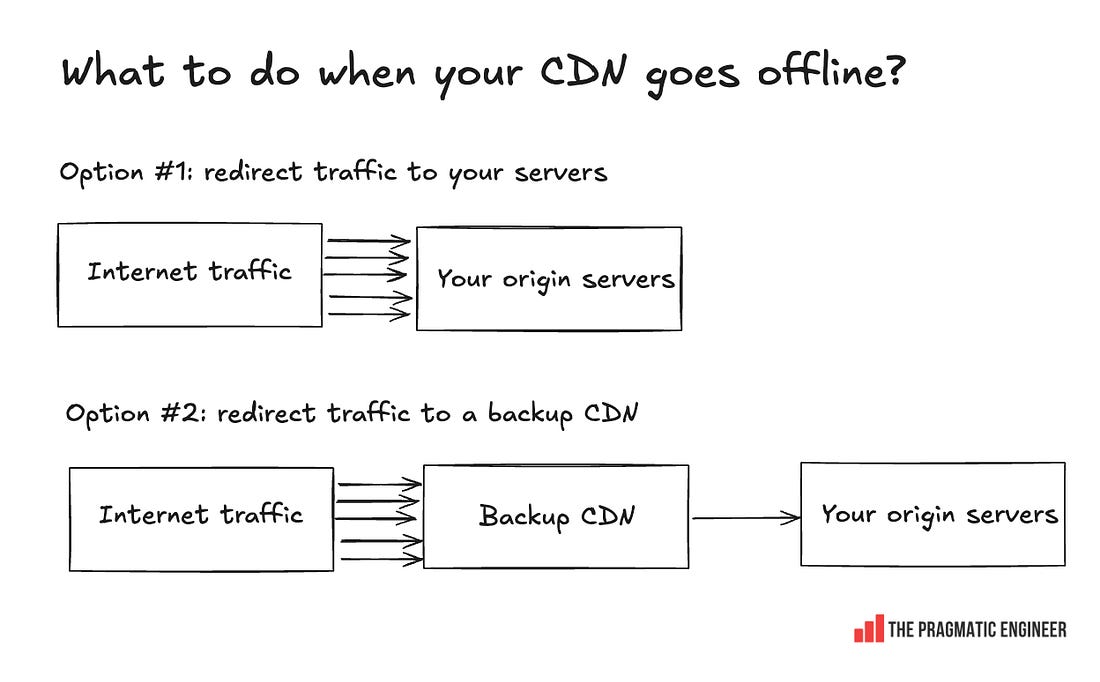
When using a CDN, you propagate addresses that point to that CDN server’s IP or domain. When the CDN goes down, you could start to redirect traffic to your own origin servers (and deal with the traffic spike), or utilize a backup CDN, if you prepared for this eventuality.
Both these are expensive to pull off:
A case study in the trickiness of dealing with a CDN going offline is the story of Downdetector, including inside details on why Downdetector went down during Cloudflare’s latest outage, and what they learned from it. This was one out of the five topics covered in this week’s The Pulse. The full edition additionally covers:
You’re on the free list for The Pragmatic Engineer. For the full experience, become a paying subscriber. Many readers expense this newsletter within their company’s training/learning/development budget. If you have such a budget, here’s an email you could send to your manager. This post is public, so feel free to share and forward it. If you enjoyed this post, you might enjoy my book, The Software Engineer's Guidebook. Here is what Tanya Reilly, senior principal engineer and author of The Staff Engineer's Path said about it:
|







Comments
Post a Comment