Inside one startup’s crazy fast AI-first makeover
👋 Hi, this is Gergely with a subscriber-only issue of the Pragmatic Engineer Newsletter. In every issue, I cover challenges at Big Tech and startups through the lens of engineering managers and senior engineers. If you’ve been forwarded this email, you can subscribe here. Inside one startup’s crazy fast AI-first makeoverCraft Docs resisted AI hype as a nimble, well-run startup – but has just made a sharp pivot to AI, building a universal agentic tool everyone there now uses. The results are phenomenal. Exclusive.
Before we start: Elin and I are running a survey on AI usage by software engineers and engineering teams. If you have 10 minutes, please consider taking part by filling out this survey. This time, we’ll share an extra, longer report – similar to this one on MCP – with everyone who does so. The industry is changing fast, and we’re aiming to provide thorough, grounded analysis of what’s going on. Thank you! The Christmas break is one of the rare times when my brother, Balint Orosz, founder of Craft Docs – a popular text editor known for its sleek UX – takes a proper break from work. But that didn’t happen last month: instead, he spent the holidays building AI tools and using AI agents. I assumed this flurry of activity was caused by the same “bug” that’s bitten many techies who’ve seen the recent leap in AI agents’ performance. On the first Monday of this year, Balint returned to Craft with a new AI tool they’re calling “Craft Agents”. It’s his take on a more opinionated Claude Code, built on top of the Claude SDK. The company has mandated every engineer and non-engineer to try adding the new tool to their workflows – and they say the results have been jaw-dropping. During January, the Craft team has completely changed how they work, and now feel more productive than ever. Also, non-engineers are hooked on using AI with Craft Agents. Is it a sign of how mature startups in tech are changing how they build software, using AI tools? That’s one topic tackled in this deepdive. First, some background. Craft has more than 1 million active users, over 50,000 paying customers, and an engineering team of 20 with a median tenure of nearly four years. They care deeply about engineering excellence and product quality: the startup won Apple’s Mac App of the Year award in 2021, and built their own, custom rendering stack to boost user experience above the competition. Craft’s AI-first makeover is not a “YOLO” (you only live once) approach like a young startup might try as a way to create some hype. It’s an experienced engineering operation deciding that AI tools have reached an inflection point which means the company needs to change how it works, or be left behind. My family ties to Craft mean I’m “in the loop” on things at the business, and it’s this insight that makes me confident this is worth looking at. Balint shares details below that are relevant for anyone in tech currently wondering how “AI-native” startups work in the age of AI, which aren’t AI labs or AI vendors. Today, we cover:
Note: I have no financial affiliation with Craft Docs, own no shares in the company, and have not been paid to write this article. Obviously, there are family ties, which in this case enabled me to convince him to share more details than he originally intended! More in my ethics statement.
If Balint’s name is familiar, it’s because we did a podcast episode covering his unconventional, design-first engineering approach at Craft. You can meet Balint and myself at The Pragmatic Summit, coming up on 11 February, in San Francisco. The bottom of this article could be cut off in some email clients. Read the full article uninterrupted, online. 1. Three years of AI experimentation with no “stickiness”Craft is a tool for docs, notes, tasks, and anything else to do with capturing ideas. Launched in 2020, its signature characteristics are low latency, high performance, seamless movement between devices (iPhone, Android, iPad, Mac, web, and Windows), and a delightful user experience. The team has long experimented with AI while avoiding the hype by refusing to ship AI features that would be gimmicks at best. Below is a timeline of their AI-related activity: 2022: basic AI assistantThey launched an AI assistant, “Craft AI Assistant”, two days before ChatGPT launched in 2022, and weeks before Notion’s own AI assistant became available. That early assistant was pretty simple:
It was also limited: the context window was only 4,096 tokens and prompts needed to be squeezed into that limit. The assistant was also “one-shot”: users asked a question, it replied, and that was that! There was no more dialogue. The AI assistant drove substantial user growth. Many users downloaded Craft just to play with it, but it quickly became obvious that the assistant was not “sticky”, which means it was simply not genuinely useful for enough users. After an initial engagement spike, people didn’t use the AI assistant repeatedly. 2023-2024: resisting “Copilot everywhere” slop temptationThe team kept experimenting with ways to add AI features that were useful for Craft, and ran experiments such as knowledge-based search using RAG, summarization, and other retrieval features. But nothing really stuck with users. Balint was keen to avoid the “Copilot fail” moment he observed at Microsoft, where the tech giant rolled out the not-particularly-useful Copilot across its entire product suite, only for customers to quickly come to associate the shiny new Copilot with uselessness. Balint said:
During this time, the company did a lot of experiments. In September 2023, they held an in-house hackathon focused on AI, for which I was a judge. As I recalled from the experience:
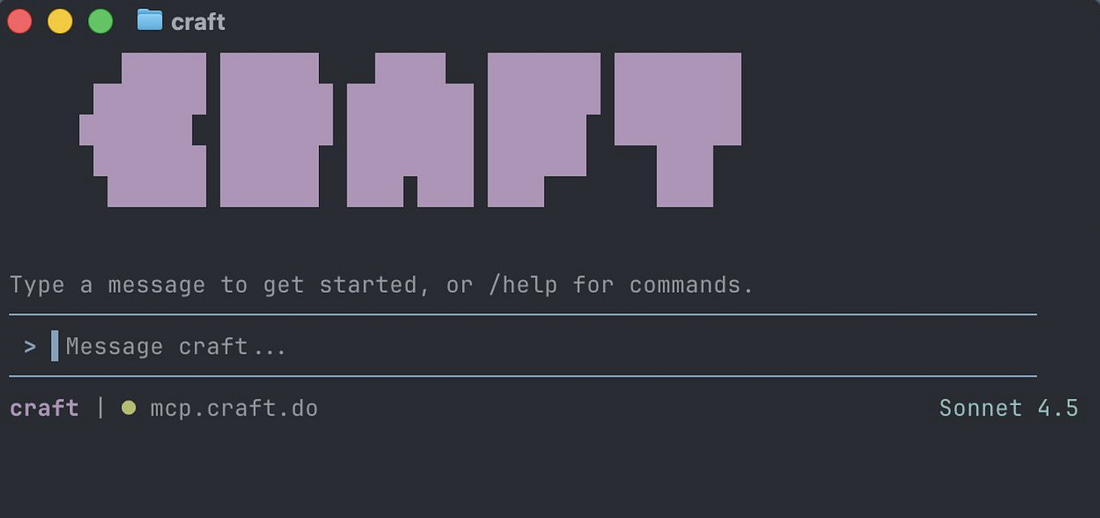
There was no shortage of enthusiasm, but that by itself doesn’t create a great user experience. December 2024: reasoning models mark turning pointLittle over a year ago, Balint rolled his sleeves up and spent two weeks experimenting with the latest reasoning models at the time, like OpenAI’s GPT-4o. This led to his first “wow!” moment as a software engineer with the 4o model. A highly requested user feature was for Craft to recognize shapes which users draw by hand. This was a problem Balint estimated would take a few weeks to properly implement. So, he gave it a go with the 4o model and to his amazement was able to implement it within a day by learning on the 4o model. The feature was shipped, users approved, and it marked the first time Balint had to admit they couldn’t have shipped a feature without AI. After that, Craft’s approach with AI became more ambitious. He assigned five senior folks from among the 20 engineers to experiment fulltime with how AI could be added to the product. They spent six months building a mobile-first agent called Chaps, similar to Peter Steinberger’s very popular Clawd bot, which ultimately was never released to the public. By October of 2025, Balint concluded that agents had started to work pretty well, but they still weren’t ready to be a standalone product. Meanwhile, the five-strong team had built up knowledge about tool calling and orchestration, which they ported back into the Craft AI assistant. In December 2025, Craft’s AI assistant got large updates which took it from being a “meh” experience for most users, to one which was helpful and popular. This new, improved AI was a lot more “sticky”, but still wasn’t the “wow!” experience Balint wanted. 2. Unexpected breakthrough: a “visual Claude Code”That month, Balint wanted to use more top-tier models like Opus 4.5, via Claude Code, so he built a prototype terminal UI (TUI) on top of the Claude Agent SDK: a framework for building production-ready agents with Claude Code as a library. This tool, named Craft Terminal, connected Craft Docs as a data source to Claude Code via the Claude Agent SDK, and worked surprisingly well. Balint used it to organize his own messy Craft Docs workspace, search in it, and ask for insights. It worked really well; much better than any previous knowledge base lookups the team had built.
The customer service team started using the Craft Terminal, but needed more sources than just Craft Docs for their work. A typical Customer Service flow resembles this:
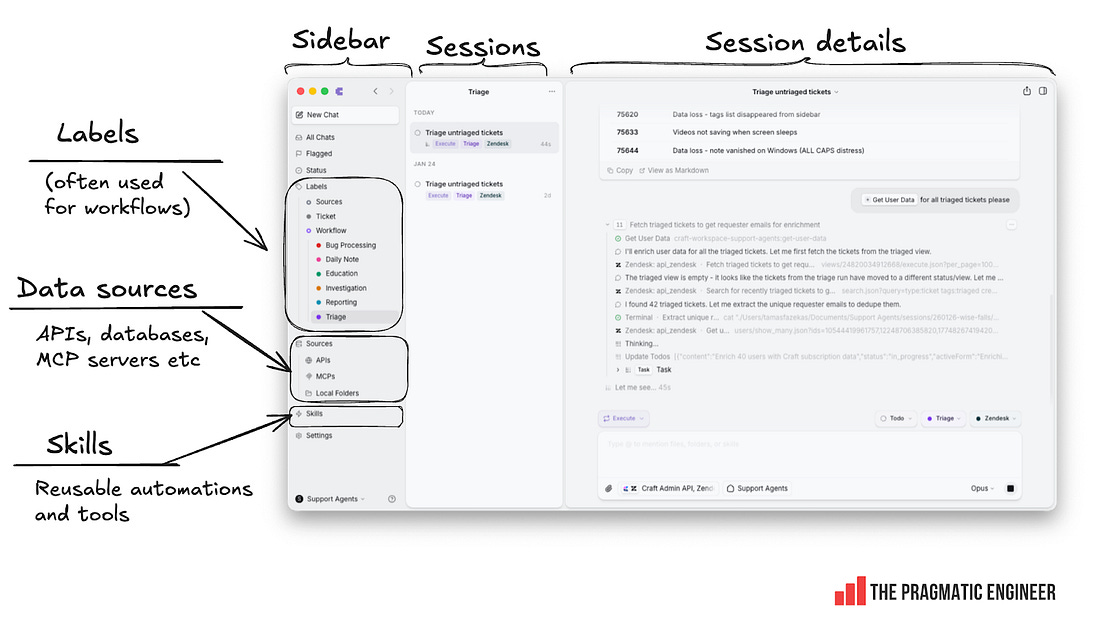
Balint added the concept of “Sources” to the Craft Terminal: the ability to add other data sources – APIs, databases, MCP servers – on top of Craft Docs. The customer service team then started creating automations for common support tasks like sending discounts to emails on academic domains. The implementation of using APIs for sources is pretty clever: an API source acts like an MCP server to the agent, but Craft Agents hijacks the request and adds the credentials needed without the agent having access to those sensitive credentials. However, the terminal interface was not beloved by Craft’s users. On December 18, he shared the Craft Terminal Agent with 15-20 external beta users. Feedback was positive and they liked it, but there were complaints about the terminal environment:
As a designer and UX lover at heart, Balint felt the terminal was holding the tool back. He asked:
So, last Christmas during the holidays, Balint decided to build a UI on top of Claude Code – and gave himself two weeks. Previously, it took him up to four months when he started Craft to build a v1 of Craft Docs that felt good. But this time, he did it all with AI, using Claude Code. As an additional challenge, he used Electron to build it, a tech stack he’d not used before. Embarking upon this project, Balint decided that if he could build a polished application in an unfamiliar tech stack within two weeks, it would be proof AI was capable of delivering a step change for Craft. If so, he would push everyone at work to start using AI coding tools. If the project failed, at least he would still learn about these models’ progress. In the event, Balint hit his self-imposed milestone: by January 5 of this year, he had completed a polished Craft Agents app that ran on Mac, Windows, and Linux, thanks to it being built on top of Electron. The result is a far more friendly experience of using Craft Docs. Below is how it looked with the terminal interface reimagined as a more “email-like” UX:
This tool was more than just a nice UI on top of Claude Code. Balint also included:
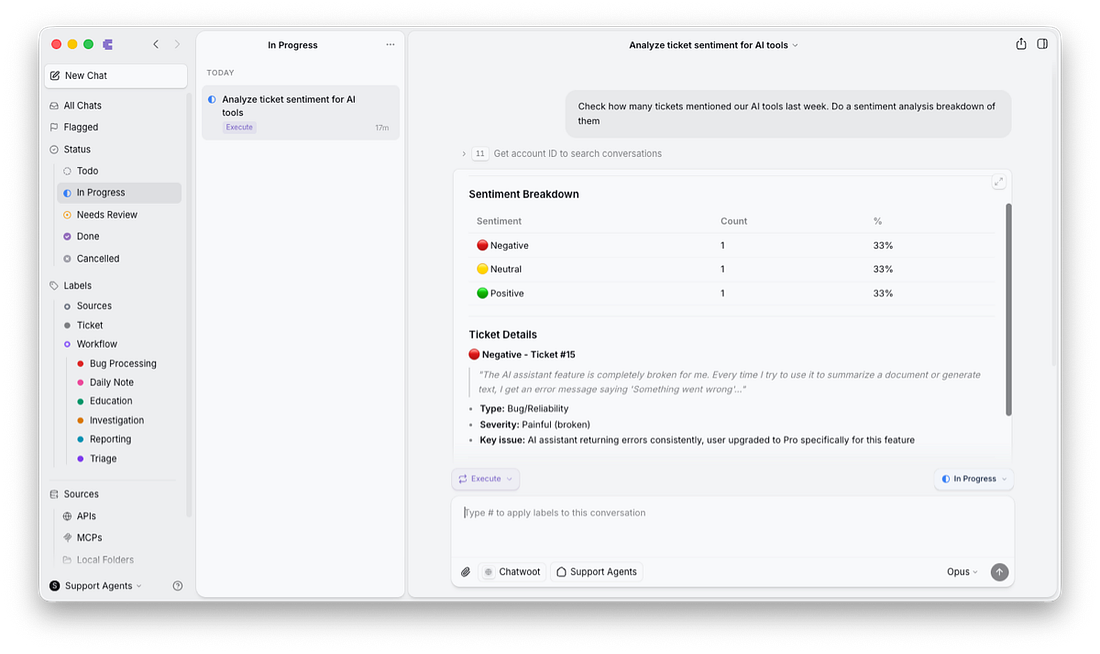
Internally, Craft Agents was an instant hit. During release week customer support, marketing, and HR all jumped on the tool, and people started automating previously manual tasks. In an unexpected development, non-technical folks started using Craft Agents more than devs! Most devs were satisfied with Claude Code’s interface, and a few started to use Craft Agents because of the nicer multitasking (with parallel chats), and the interface being much easier to scroll, read, and view for things like long code changes. On 19 January – almost exactly a month after the first line of code was written – Balint open sourced Craft Agents under the Apache License 2.0. 3. How non-engineers use “visual Claude Code”I wanted to understand why Craft’s non-engineering teams have been so enthusiastic about using Craft Agents, and what’s changed as a result. As mentioned, the biggest adopters have been in customer support, so I sat down with Tamas Fazekas, head of customer support at Craft, who explained: Custom workflows are the core of the team’s usage. They’ve built workflows for:
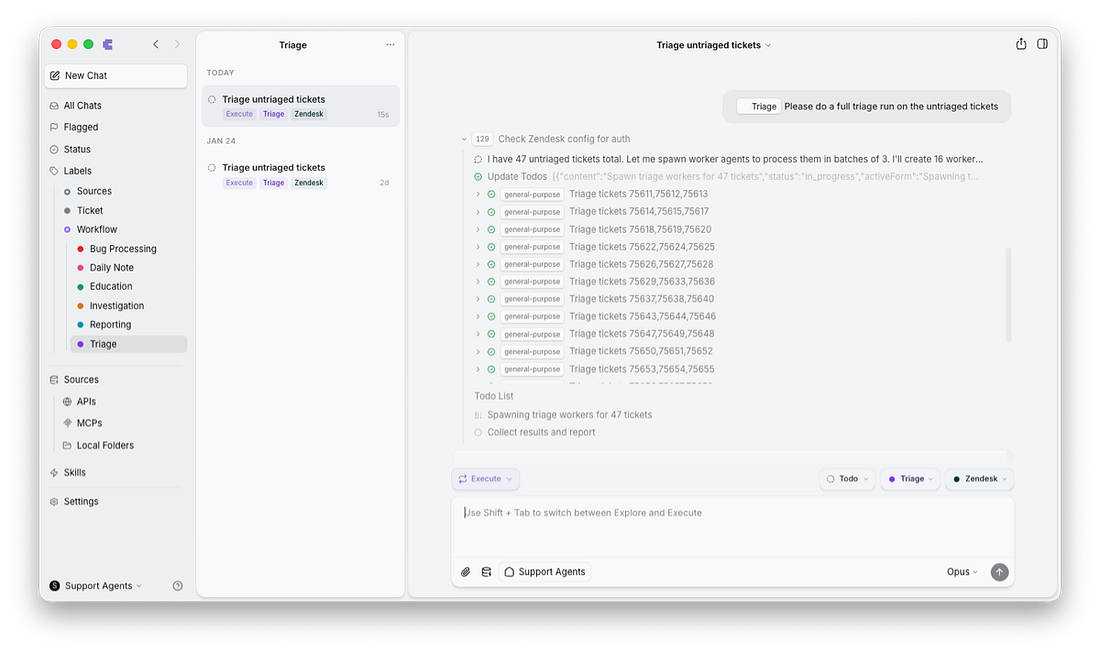
Let’s take a look at a few workflows using this tool: Triaging workflow with agentsParallel agents are helpful for processing triage tasks in bulk. When there’s a large number of customer tickets, the tool automatically kicks off parallel agents to go through triage:
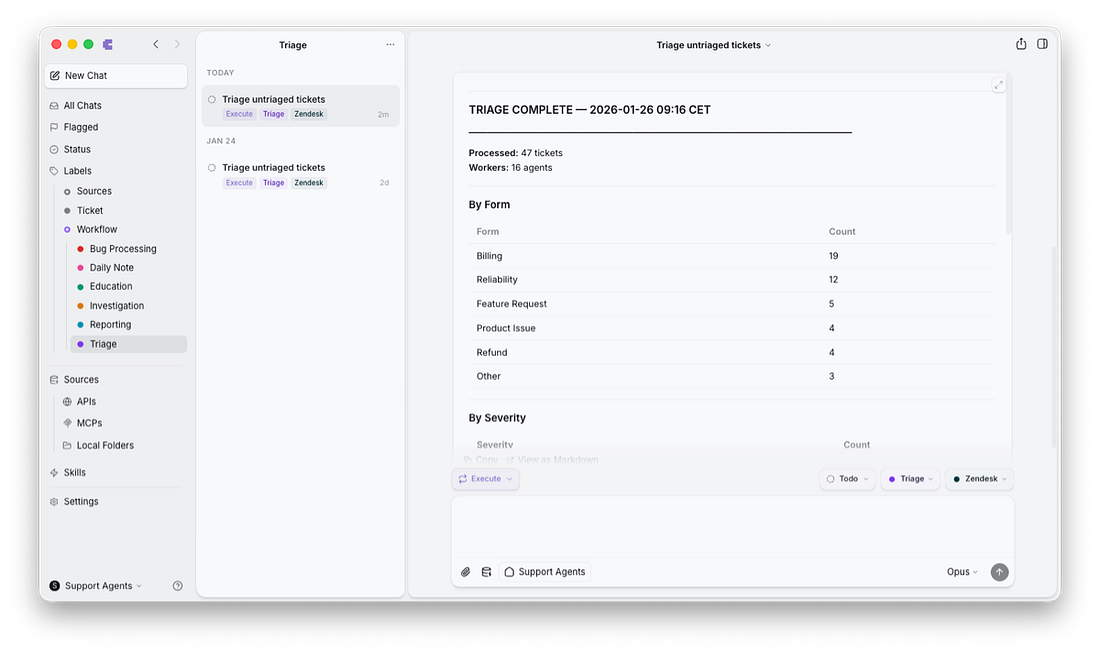
When triage is complete, the agent provides a report to the customer support person who kicked off the work.
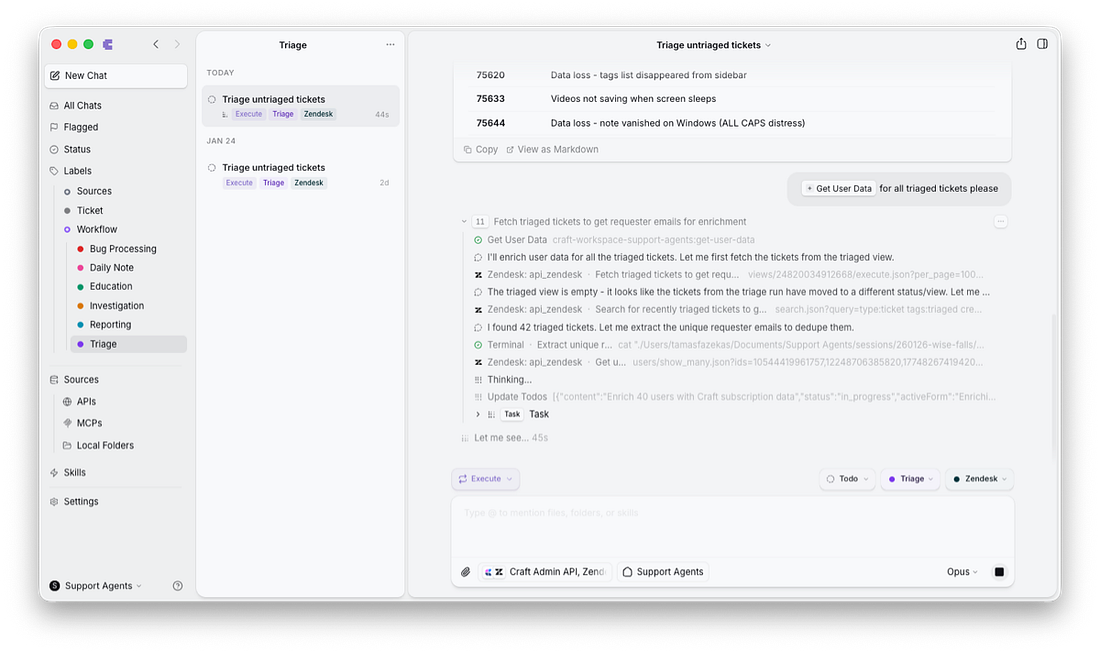
Data enrichments are used in almost every workflow. The customer support team defined a skill called “Get User Data”. It uses a Craft backend API to look up the user profile based on the user’s email in the Zendesk field, and adds the user’s plan type, billing status, feature flags (feature access), and usage metrics to the ticket. The support agent no longer needs to open a separate tool to get all these details.
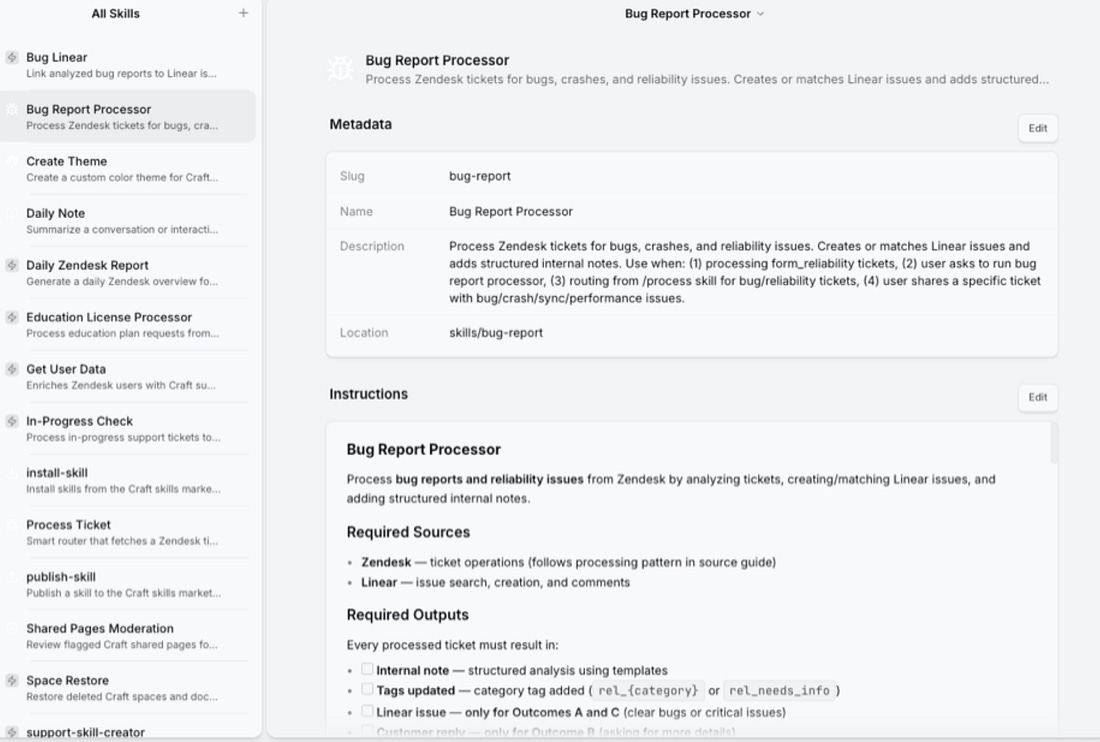
Bug processing workflow: issues reported faster, automatically to engineeringThe “bug report processor skill” has greatly sped up dealing with bug reports. It’s similar to Claude Code’s skills feature. The skill defines data sources (Zendesk and Linear) and defines the required output (a structured analysis with tags and categories). It instructs the agent to:
Here’s how this skill is defined:
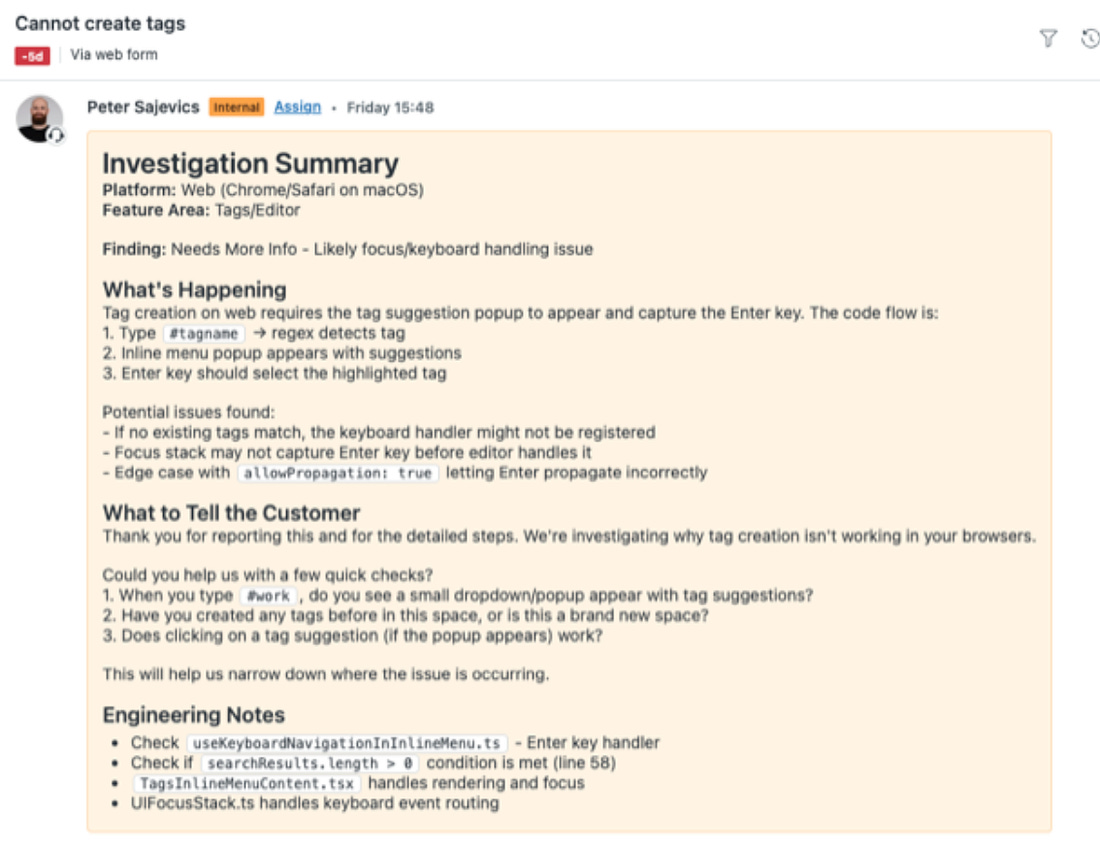
Below is an example of how it updates the Zendesk ticket with a suggestion on how the customer support agent should respond:
The customer support team have been pretty delighted about how their workflows have gotten better. Here’s Cusomer Experience (CX) lead, Peter Sajevics, on what’s changed:
Skills built by customer supportDuring just two weeks of using Craft Agents, the customer support team have built these skills:
Use cases in other non-engineering teamsToday, all non-engineering teams at Craft are heavy users of the tool:
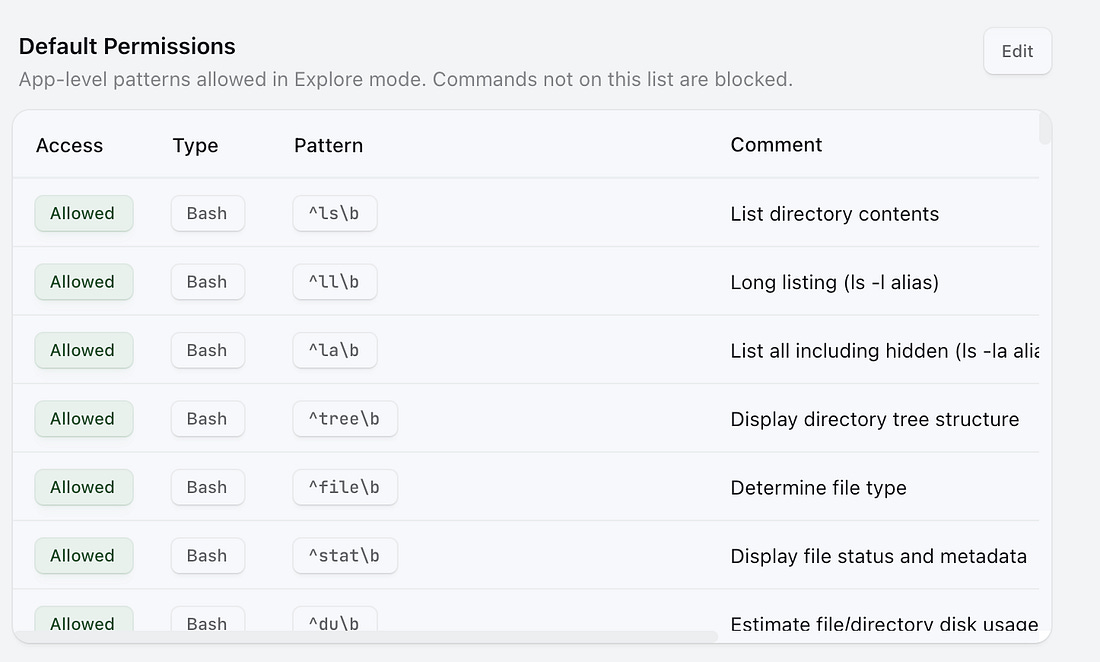
Additional permissions system to avoid accidentsThe Craft team uses this tool for real, customer-facing work. But of course, LLMs are nondeterministic and can make mistakes which go on to cause problems in production. To deal with this, Craft Agents has an additional permissions system. Sessions can run in one of three modes:
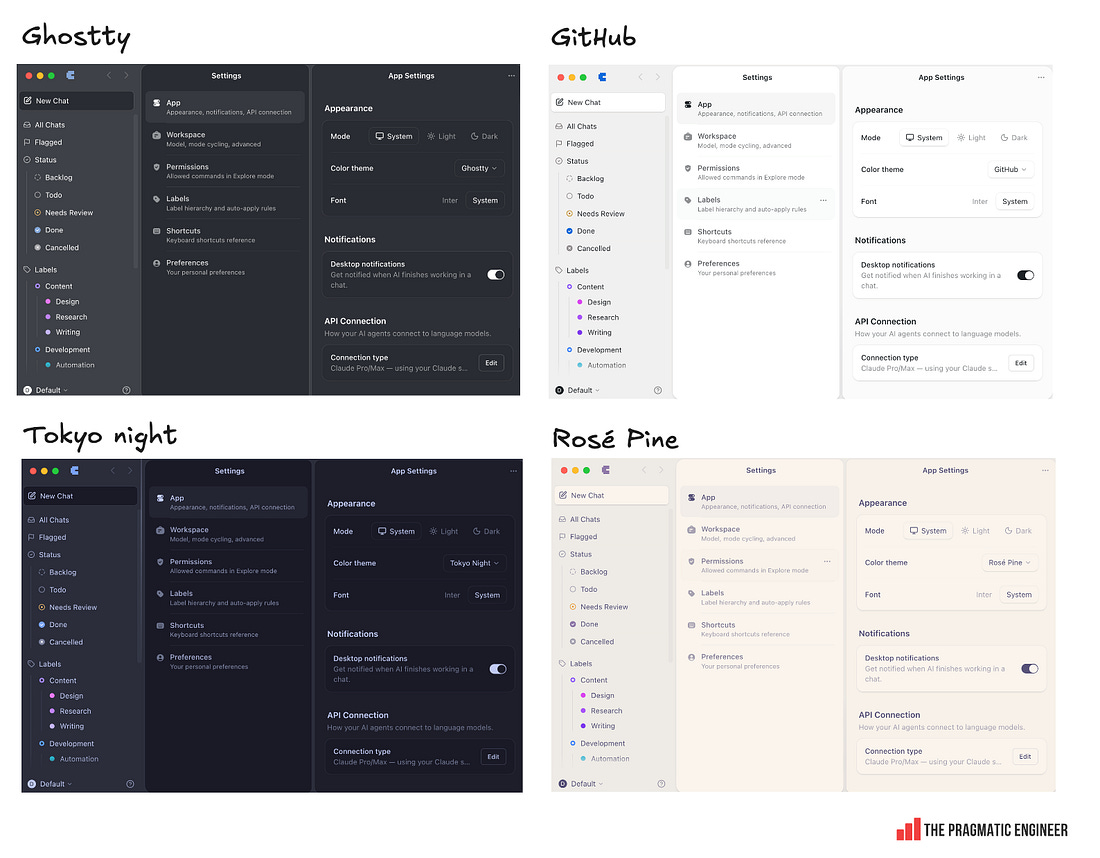
When starting a new session, the default mode is “Explore”. Engineers use Craft Agents – but less than non-devsSome engineers have onboarded to Craft Agents, but most prefer Claude Code for the majority of product development work. The reasons that a few engineers prefer Craft Agents is its easier overview of parallel agent execution, and a more pleasant interface for reviewing lengthy code changes since scrolling is more convenient than reviewing on a terminal. Creating custom themesCraft Agents comes with several pre-built themes, like Ghostty, GitHub, Tokyo Night, Rosé Pine, and a dozen more:
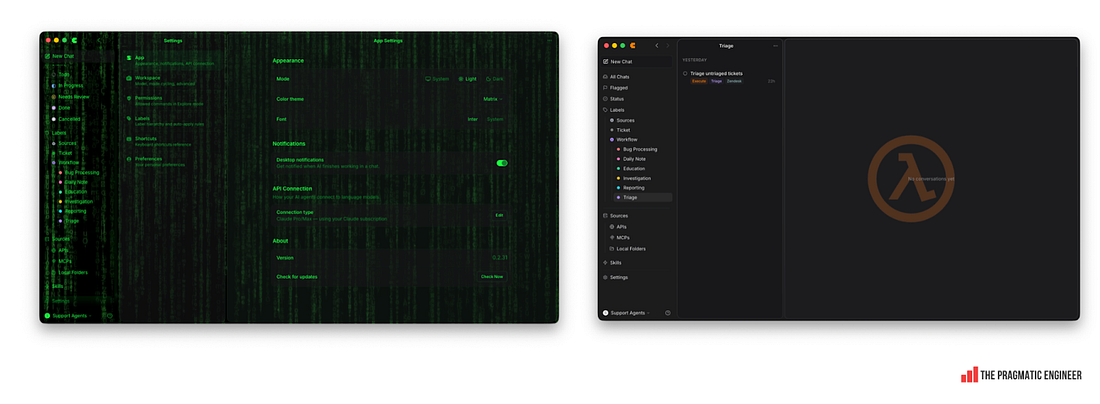
You might think this is enough choice, but it’s not! One customer support person instructed Craft Agents to design a new theme imitating the Matrix. The agent obliged, and custom themes started spreading in the office. Here are some popular ones:
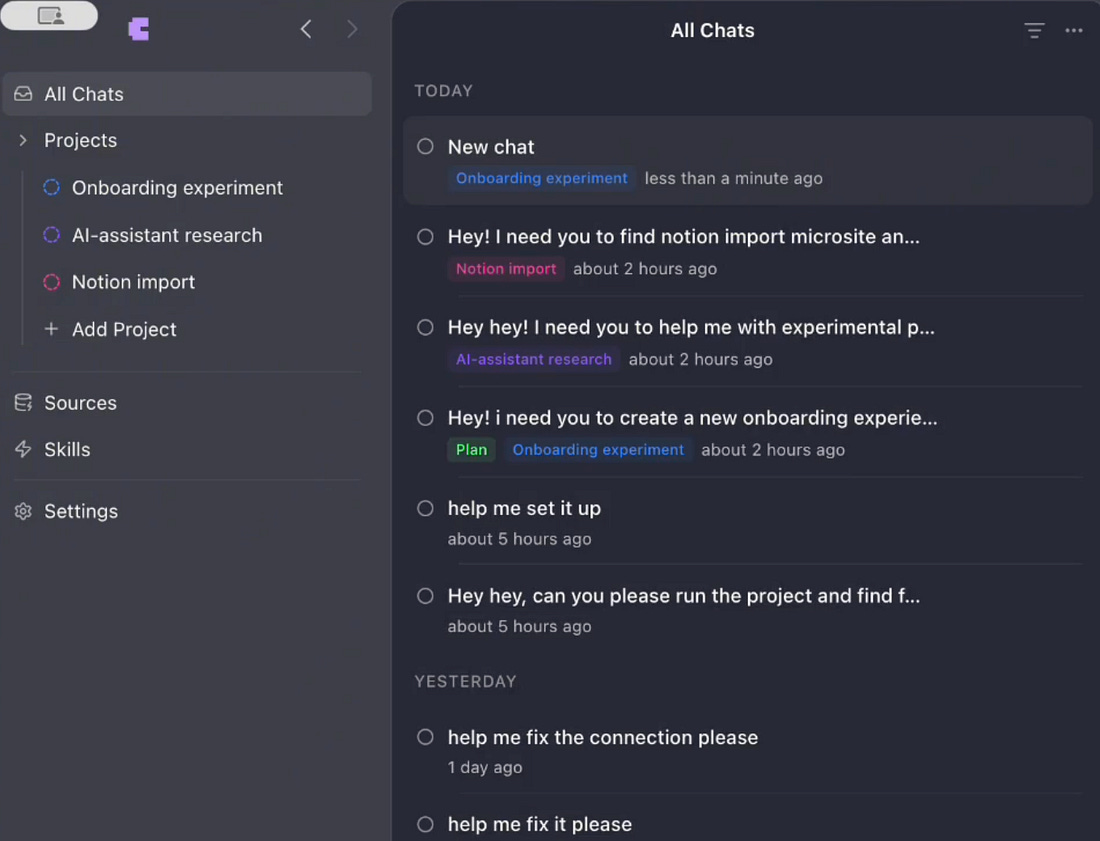
“Remixing” Craft Agents is already a thingCraft Agents is open source which means anyone can fork the code and make changes. The Apache 2.0 license is permissive: you can fork, modify, and distribute your fork however you want. The only constraint is that you must include a copy of the Apache 2.0 license text itself with the distributed work. Forking and modifying for personal needs is already happening. Here’s an example from researcher, Lisa Skorobogatova, who remixed Craft Agents by instructing the agent to make changes to its own code to support projects, and allow drag-and-drop to move chats into projects:
4. New way to build software?Until now, software at Craft was built the usual way:
But with Craft Agents, engineering is also done differently:... Subscribe to The Pragmatic Engineer to unlock the rest.Become a paying subscriber of The Pragmatic Engineer to get access to this post and other subscriber-only content. A subscription gets you:
|




Comments
Post a Comment